How to setup goals & funnels in Google Analytics Correctly?
Set Up Goals & Funnels in Google Analytics
First Starting with the setup of goals
Step 1 - Click on Admin at the left bottom corner of the screen
Step 2 - Click goals in the reporting view column.

Step 3 - Click on Add New Goal
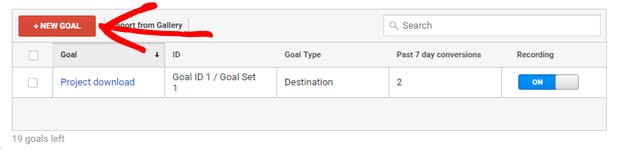
Step 4 - If you are able to see template, then i would suggest you select custom. afterthat click on continue.
Step 5 - Enter Goal Name
Step 6 - Select Goal slot ID.
Step 7 - Then select from Type of goals click destination & click continue

Step 8 - Enter the page URL path which you noted earlier. For Eg - news/thank-you as the destination.

Step 9 -If it is necessary then Adjust the Match Type.
- Equals to - Exactly Same URL. For Eg - you enter /thank-you then conversion counted if the someone view /thank-you. but when /thank-you?id=18 then not counted
- Begins With - Same URL even the extra detail also occur in the URL. You enter /thank-you conversion will be counted if someone view /thank-you or /thank-you?id=18.
- Regular Expression - Match with the URL which is based on regular expression. For eg - you enter /thank-you\?id=(news|contact) then the conversion will be count if someone see /thank-you?id=news or /thank-you?id=contact.
Step 11 - We select destination as goal type which means that we have to define a funnel.

Step 12 - Click on verify goal & check the goal conversion looks. If goal conversion rate showing zero then you have to select the configuration of the goals.
Step 13 - Click on Save, now your goal tracking is ready for use.
Step

Comments
Post a Comment